See it in action
Native GNOME look and feel — no external dependencies.
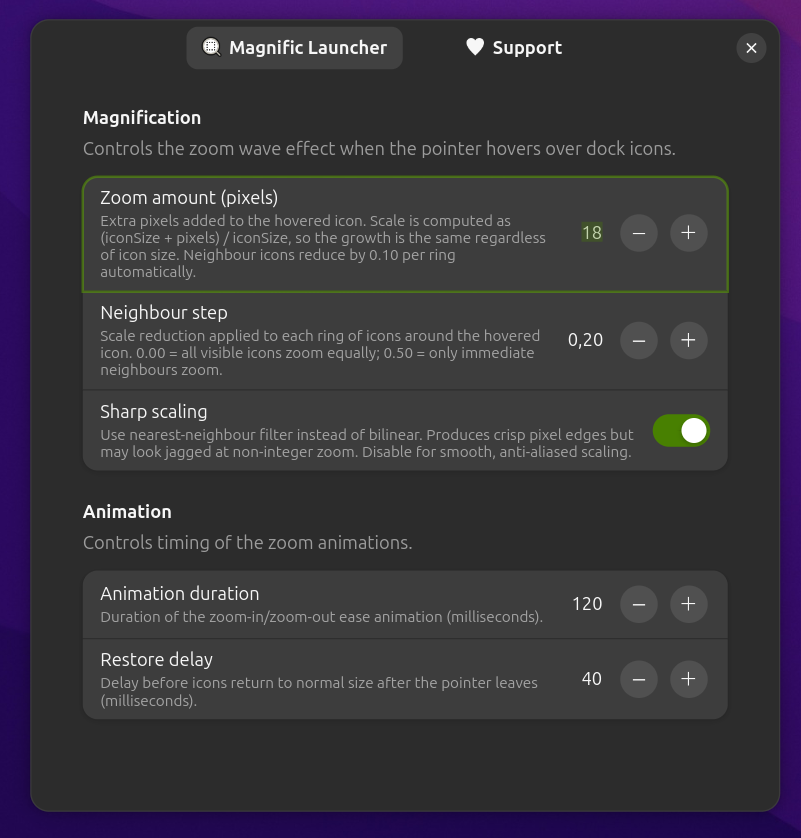
Preferences window — all settings in one place, native Adwaita UI

Magnification effect in action — the hovered icon grows and neighbours scale progressively
A smooth, macOS-style magnification wave effect for your GNOME dock. Hover over any icon and watch the ripple — elegant, fast, and fully configurable.
↑ Hover over the dock to preview the effect
COMPATIBLE WITH
Subtle by design. Configurable by choice.
The hovered icon grows and neighbouring icons scale progressively — a smooth ripple that feels natural.
Zoom is expressed in pixels, not percentages. The visual growth is always the same absolute amount regardless of icon size — no distortions.
Only transform scaling is applied — no CSS overrides, no layout shifts. Works with any icon theme or GTK theme.
EASE_OUT_QUAD easing via Clutter's native animation engine. No JavaScript timers, no repaints — just GPU-accelerated transforms.
Icons scale from their visual centre. Configurable scaling filter (bilinear or nearest-neighbour) and offscreen-redirect control reduce blur.
Tweak zoom amount, wave spread, animation speed, and restore delay — all from a native preferences window, no file editing needed.
Native GNOME look and feel — no external dependencies.
Preferences window — all settings in one place, native Adwaita UI
Magnification effect in action — the hovered icon grows and neighbours scale progressively
All parameters are adjustable at runtime — no shell restart needed.
| Setting | Default | Range | Description |
|---|---|---|---|
| Zoom amount | 8 px |
2 – 64 px | Extra pixels added to the hovered icon. Scale = (iconSize + px) / iconSize. |
| Neighbour step | 0.10 |
0.00 – 0.50 | Scale reduction per ring. 0 = flat zoom; 0.5 = narrow wave. |
| Sharp scaling | Off | on / off | Nearest-neighbour filter for crisp edges. Bilinear when off (smoother). |
| Animation duration | 120 ms |
50 – 500 ms | Duration of the zoom-in / zoom-out ease animation. |
| Restore delay | 40 ms |
0 – 200 ms | Delay before icons return to normal after the pointer leaves. |
One script does everything — copy files, compile the schema, and enable the extension.
Grab the source from GitHub.
git clone https://github.com/gilson-fonsaca/magnific_launcher
cd magnific_launcher
Copies files, compiles the GSettings schema, and enables the extension automatically.
./install.sh
On Wayland log out and log back in. On X11 press Alt+F2, type r, and press Enter.
Adjust the effect to your liking.
gnome-extensions prefs magnific-launcher@gilsonf
Magnific Launcher is free and open-source, maintained in spare time. If it makes your desktop a little nicer, consider buying me a coffee!